How to Reset a Forgotten 99exch Password – Complete Step‑by‑Step Guide
Introduction
For traders and investors using the 99exch platform, a secure and accessible account is essential. However, forgetting a password is a common issue that can temporarily block access to valuable trading tools, portfolio data, and market insights. This article provides a comprehensive, step‑by‑step walkthrough of the password‑recovery process, explains the security mechanisms behind it, and offers practical tips to prevent future lockouts.
Why Password Recovery Matters
The password‑reset feature is more than a convenience; it safeguards both the user and the exchange. By requiring verification steps, 99exch ensures that only the legitimate account holder can regain entry, reducing the risk of unauthorized transactions, identity theft, and potential financial loss. Understanding the underlying process helps users feel confident that their personal data remains protected throughout recovery.
Preparing for the Reset Process
Before initiating a password reset, gather the following information to streamline the experience:
- The email address or mobile number linked to your 99exch account.
- Any two‑factor authentication (2FA) device or app you have previously set up.
- Recent account activity details (e.g., last login location) in case support requests further verification.
Having these items ready will reduce wait times and eliminate the need for multiple support tickets.
Step‑by‑Step Guide to Resetting Your Password
1. Locate the Forgot Password Link
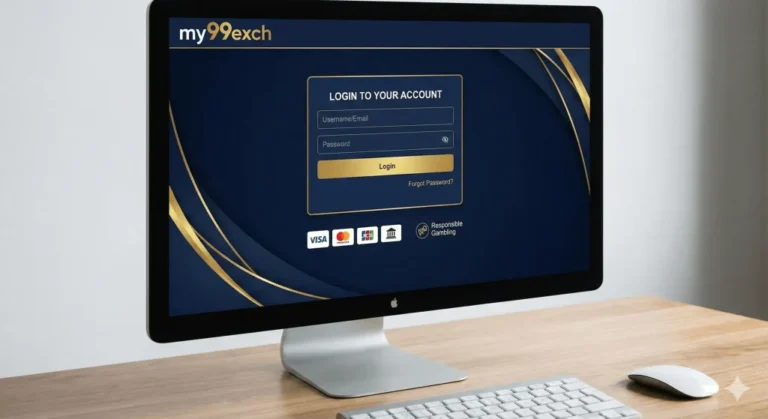
Navigate to the official login page of 99exch. Directly below the sign‑in fields, you will find a “Forgot Password?” hyperlink. Clicking this link opens the recovery portal where the reset workflow begins.
2. Submit Your Registered Identifier
Enter the email address or mobile number you used during registration. The system will instantly check the entry against its database. If the identifier matches, a security code is generated and dispatched via the chosen communication channel (email or SMS).
3. Verify the Security Code
Retrieve the code from your inbox or messaging app. Input the six‑digit code into the verification field within the allotted time window—typically ten minutes. This step confirms that you have access to the registered contact method.
4. Create a New Strong Password
Upon successful verification, you will be prompted to set a new password. Follow the platform’s complexity requirements, such as:
- Minimum 12 characters.
- At least one uppercase letter, one lowercase letter, one numeral, and one special character.
- Avoidance of easily guessed sequences (e.g., “123456”, “password”).
After entering and confirming the new password, submit the form to finalize the reset.
5. Re‑authenticate with Two‑Factor Authentication
If you have 2FA enabled, you will be asked to provide the current authentication token from your authenticator app or hardware device. This additional layer ensures that even if the password is compromised, unauthorized users cannot gain entry without the second factor.
6. Confirmation and Account Review
Following a successful password change, 99exch sends a confirmation notification to the registered email and/or phone number. It is advisable to review recent account activity immediately, especially if you suspect any suspicious behavior prior to the reset.
Common Issues and How to Resolve Them
Code Not Received
If the security code fails to arrive, first check your spam or junk folder. Verify that the email address or mobile number entered is correct. In case of persistent delivery problems, use the platform’s live chat or support email to request a manual resend.
Code Expired
Security codes have a short lifespan for safety reasons. If you miss the deadline, simply request a new code by repeating step 2. Do not attempt to guess or reuse an older code, as this will lock the reset attempt temporarily.
Forgotten Registered Email or Phone
When you cannot recall the exact identifier associated with your account, try any email addresses or phone numbers you have used in the past. If none work, contact the support team with proof of identity (government‑issued ID, utility bill) to verify ownership.
Two‑Factor Authentication Failures
Lost access to your authenticator app? 99exch typically offers backup codes generated during initial 2FA setup. Locate these codes in a secure offline storage. If you have no backup, open a support ticket; the team will guide you through identity verification and reset the 2FA configuration.
Best Practices to Avoid Future Password Lockouts
Implementing proactive security habits reduces the likelihood of forgetting passwords:
- Password Manager: Use a reputable password manager to store complex passwords securely. This eliminates the need to memorize each credential while maintaining high entropy.
- Regular Updates: Change passwords periodically (e.g., every six months) and avoid reusing passwords across different services.
- Backup Authentication Methods: Keep backup 2FA codes in a safe place, and consider enrolling a secondary device for authentication.
- Maintain Updated Contact Information: Ensure that your email address and phone number are current on the platform, so recovery messages are always delivered.
When to Contact Support Directly
While the automated reset process covers most scenarios, certain situations require direct assistance:
- The account is locked due to multiple failed login attempts.
- You suspect that the account has been compromised before you could reset the password.
- Your registered email or phone number is no longer accessible.
- You need to deactivate or delete the account for regulatory compliance.
In these cases, submit a detailed request through the 99exch id register or the dedicated support portal, providing the necessary identification documents. The support team typically responds within 24–48 hours.
Security Highlights of 99exch’s Password Recovery
99exch incorporates several advanced security measures to protect user accounts during the reset workflow:
- Encrypted Transmission: All communications, including code delivery and password changes, occur over TLS‑encrypted channels.
- Rate Limiting: The system limits the number of reset attempts per hour to prevent brute‑force attacks.
- Device Fingerprinting: The platform records the device and IP address used for the reset request, flagging anomalous patterns for further review.
- Audit Trails: Every password change is logged, providing an immutable record for both users and compliance auditors.
Additional Resources for 99exch Users
Beyond password recovery, the platform offers a robust knowledge base covering topics such as account verification, fund withdrawals, and market analysis tools. Access these resources by logging into your 99exch id login and navigating to the “Help Center” section.
Conclusion
Forgetting a password should never result in prolonged downtime or heightened security risk. By following the structured reset steps outlined above, verifying your identity through secure codes, and adhering to best‑practice recommendations, you can quickly regain access to your trading account while maintaining the highest level of protection. Regularly updating credentials, employing a password manager, and keeping your contact details current will further minimize future interruptions. Should any complication arise, the dedicated support team—reachable via the platform’s official channels—stands ready to assist you in restoring full account functionality.